Stack Media Hosting
  • 0 Shopping Cart
  • Home
  • Store
    • Browse All
    • SSD Shared Hosting
    • WordPress Loginizer Plugin
    • Website Security
    • E-mail Services
    • Register a New Domain
    • Transfer Domains to Us
  • Announcements
  • Knowledgebase
  • Network Status
  • Contact Us
  • More
  • Account
    • Login
    • Register
    • Forgot Password?
  1. Portal Home
  2. Knowledgebase
  3. WordPress
  4. Installing WordPress with Softaculous

  Categories

Cloudflare
2
cPanel
7
Emails
5
General
10
Woocommerce
8
WordPress
27

  Categories

  Support

My Support Tickets
Announcements
Knowledgebase
Downloads
Network Status
Open Ticket

Installing WordPress with Softaculous Print

  • 0

We will want to log into your cPanel account. If not sure how please visit our article on how to do this before continuing -https://www.stackmediahosting.com/index.php/knowledgebase/1/Login-into-cPanel.html

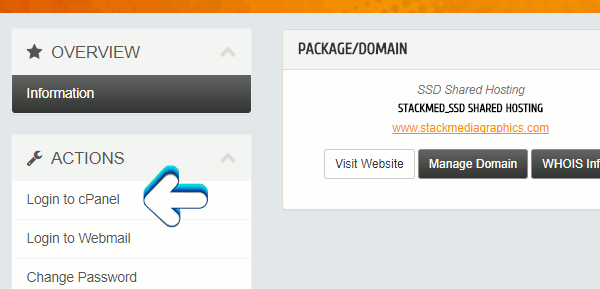
Click on Login to cPanel


Scroll down to SOFTACULOUS APPS INSTALLER. Click on WordPress which will bring you to the Softaculous WordPress Install Page.

Softaculous WordPress install in cPanel

Author: Jesse Lange

Was this answer helpful?

Related Articles

Installing WordPress Themes Installing a WordPress theme is relatively easy. There are two ways of going about it.... The best plug-in for building a WordPress website Page builder by SiteOrigin is in my opinion the best editing add-on plug-in for WordPress. It's... Inserting content using Page Builder by Site Origin This article already assumes you have the Page Builder by Site Origin installed and configured.... Installing and setting up Page Builder by SiteOrigin This article I'm going to show you how to install the very popular Page Builder by SiteOrigin.... Configuring the navigation menus in WordPress In this article we will be going over how to edit menus in WordPress. We will be covering how to...
« Back

  Support

My Support Tickets
Announcements
Knowledgebase
Downloads
Network Status
Open Ticket
  • Contact Us

Copyright © 2026 Stack Media Hosting. All Rights Reserved.


Loading...
Loading...
Choose language
العربية
Azerbaijani
Català
中文
Hrvatski
Čeština
Dansk
Nederlands
English
Estonian
Persian
Français
Deutsch
עברית
Magyar
Italiano
Macedonian
Norwegian
Português
Português
Română
Русский
Español
Svenska
Türkçe
Українська

Generate Password

Please enter a number between 8 and 64 for the password length